Quick Summary (Quick Answer)
Advertising on ChatGPT is a next-generation conversational advertising model managed through the OpenAI Ads platform (ads.openai.com) that relies on the user’s conversational context and semantic intent (prompt-intent) rather than traditional keyword matching. Advertisers define campaign objectives (for example, website clicks), target geography, contextual topics, and negative filters to serve sponsored native cards immediately beside or below the organic response in the ChatGPT chat interface. Because this system engages at the high-intent moment when a user is directly trying to solve a business or investment problem, it has the potential to generate more qualified traffic than traditional search and social media advertising. A successful ChatGPT advertising strategy depends not only on in-platform click optimization, but also on connecting the post-click landing page to the CRM infrastructure through UTM tracking, automatically scoring the lead (lead scoring), and ensuring the sales team makes rapid contact (speed to lead).
Table of Contents
- What Is OpenAI Ads and How Does It Work?
- Comparison with Traditional Advertising Models: Google Ads, Meta Ads, and OpenAI Ads
- Steps to Create a ChatGPT Ad Campaign (24 Steps)
- Contextual Targeting and Topic Selection Strategy
- Analyzing Budget, Bidding, and Estimated Results
- Post-Campaign Performance and Reporting Analysis
- CRM and Sales Funnel Integration for ChatGPT Ads
- How Ads Appear in Live User Conversations (3 Real Case Studies)
- 10 Common Mistakes and How to Fix Them
- Frequently Asked Questions (25 Questions & Answers)
- Sources and About the Author
What Is OpenAI Ads and How Does It Work?
OpenAI Ads is the official advertising management infrastructure that enables advertisers to engage with their target audiences within AI-powered generative conversational systems. This system represents a new paradigm referred to in the digital marketing literature as Conversational Advertising.
On traditional search engines, advertisers bid on the few-word queries (keywords) that users type into the search bar. On large language models (LLMs) such as ChatGPT, however, users don’t type queries; they share multi-turn prompts containing detailed business scenarios, investment dilemmas, technical problems, or analysis requests. OpenAI Ads analyzes this conversational flow at the semantic level in real time.
+-------------------------------------------------------------------------+
|            TRADITIONAL SEARCH vs. CONVERSATIONAL ADVERTISING            |
+-------------------------------------------------------------------------+
| Google Search:  [crm software pricing] ----> Static Ad Links            |
|                 (Keyword-based auction, passive results list)           |
|                                                                         |
| ChatGPT:        "I want to set up a WhatsApp integration with Bitrix24  |
|                 for my 50-person real estate sales team. How should I   |
|                 design the architecture?"                               |
|                 -----> In-Depth AI Response                             |
|                 + [Sponsored Card: Koray Yalçın - CRM & Growth Systems]
|                 (Matched to prompt intent and problem context)          |
+-------------------------------------------------------------------------+
Prompt-Intent and Contextual Matching Logic
At the core of OpenAI Ads lies the concept of Prompt-Intent. Rather than focusing on literal word matches in the user’s text, the system examines the semantic vector behind the text:
- Multi-Turn Context Evaluation: Even if the user asks a question at the third or fourth step of the conversation, the industry or problem context mentioned in
Comparison with Traditional Advertising Models
To position ads served on ChatGPT correctly, it is essential to examine how they differ structurally from Google Search Ads and Meta Ads.
| Comparison Criterion | OpenAI Ads (ChatGPT) | Google Search Ads | Meta Ads (FB / IG) |
|---|---|---|---|
| Targeting Logic | Prompt intent, contextual topics, and semantic matching | Keywords (exact, phrase, and broad match) and negative keyword lists | Demographic audiences, interests, and Lookalike audiences |
| User Intent (Mindset) | Active Problem-Solving & Decision-Making: The user is engaged with an in-depth business or research problem | Information / Link Seeking: The user wants to find the best website or price | Passive Consumption (Discovery): The ad captures the user’s attention while they consume entertainment or content |
| Ad Format | Native card: headline, description copy, brand name, and a horizontal image card | Text headlines, descriptions, and sitelink extensions | Image, video, carousel, Stories, and Reels formats |
| User Interruption | A complementary card placed beside or below the response, without disrupting the conversation flow | Ranked links at the very top of the search engine results page (SERP) | A sponsored post inserted into the middle of the user’s social media feed |
| Click-Through Rate (CTR) Expectation | 1.5% – 2.5%+ (Above industry averages due to high intent) | 2.0% – 5.0% (Higher for branded searches; 1–2% for generic searches) | 0.8% – 1.5% (Varies by format and industry) |
| Funnel Position | Full-Funnel (MOFU & BOFU-focused): Direct expert solution at the moment of decision | BOFU & TOFU: Purchase-intent queries or general searches | TOFU & MOFU: Awareness and retargeting |
| CRM Integration Requirement | Critical: Because incoming leads are highly qualified, rapid response (Speed to Lead) is essential | Standard: Form and call tracking are implemented | Standard: Lead forms are synced to the CRM |
Steps to Create a ChatGPT Ad Campaign
Building a campaign from scratch on the OpenAI Ads platform involves 3 main phases and 24 practical steps. The steps below document, one by one, the configuration applied in a live campaign dashboard.
[PHASE 1: CAMPAIGN LEVEL]
├── 1. Dashboard Access (ads.openai.com)
├── 2. New Campaign Menu
├── 3. Setting the Campaign Name
├── 4. Campaign Type (Standard)
├── 5. Campaign Objective (Clicks)
└── 6. Defining the Conversion Event
        │
[PHASE 2: TARGETING, BUDGET AND ADS]
├── 7. Geographic Targeting (Locations)
├── 8. Excluded Locations
├── 9. Platform and Device Distribution
├── 10. Language Options
├── 11. Landing Page UTM Parameters
├── 12. Defining the Ad Group
├── 13. Contextual Topic Targeting
├── 14. Negative Topic Filtering
├── 15. Free-Text Target Audience Definition
├── 16. Number of Ads per Ad Group
├── 17. Budget Type Selection (Daily vs. Lifetime)
├── 18. Setting the Budget Amount
├── 19. Bidding Strategy (Maximize Clicks)
├── 20. Campaign Scheduling and Timing
├── 21. Ad Copy (Headline & Description)
└���─ 22. Visual Creative Standards
        │
[PHASE 3: REVIEW, POLICY AND LAUNCH]
├── 23. Preview and Estimated Results Analysis
└── 24. OpenAI Advertising Policies and Launch
Step 1: Accessing the OpenAI Ads Management Dashboard
Sign in to the OpenAI Ads management dashboard at ads.openai.com using your corporate OpenAI account. The dashboard gives you a centralized view of campaign status, spend, click metrics and account settings.
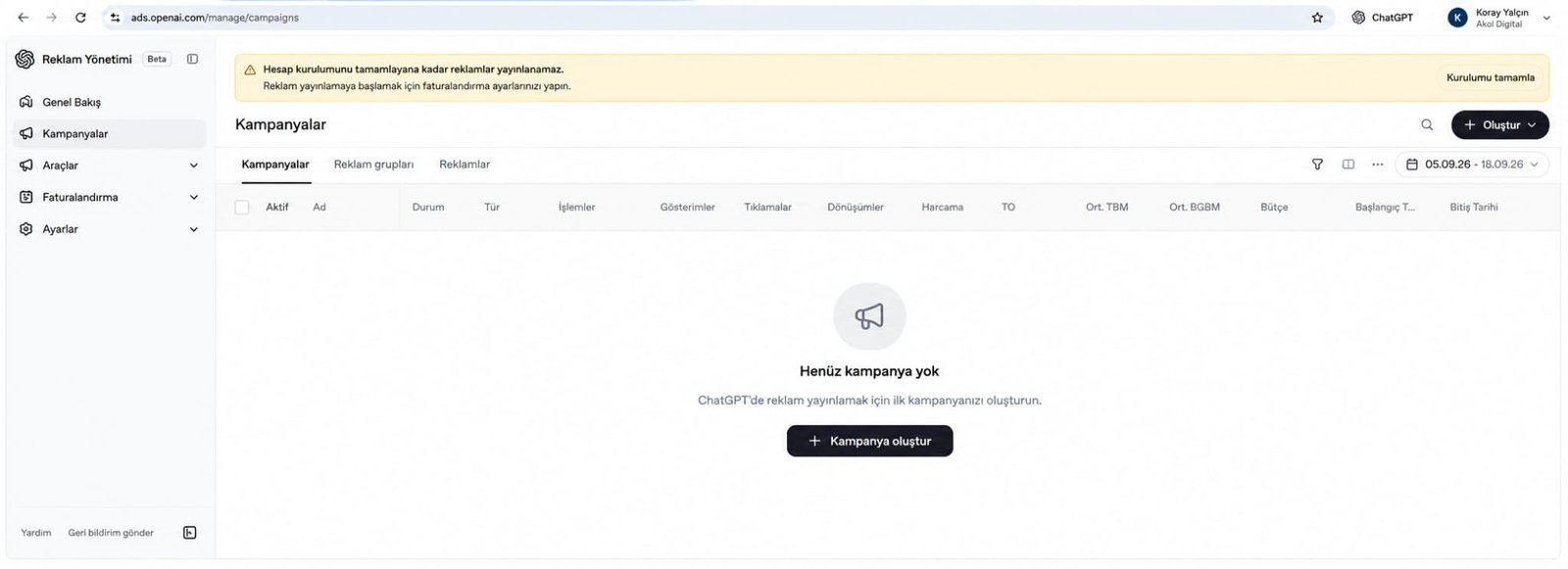
When you sign in for the first time, the dashboard displays a “No campaigns yet” notice. The ”+ Create campaign” button here, or the create menu in the top toolbar, is the starting point for your first campaign.
Step 2: The New Campaign Creation Menu and Options
The ad hierarchy in the OpenAI Ads dashboard consists of three layers: Campaign, Ad Group and Ad. Depending on your needs, you can launch the entire structure directly from this menu or add new ad groups under an existing campaign.
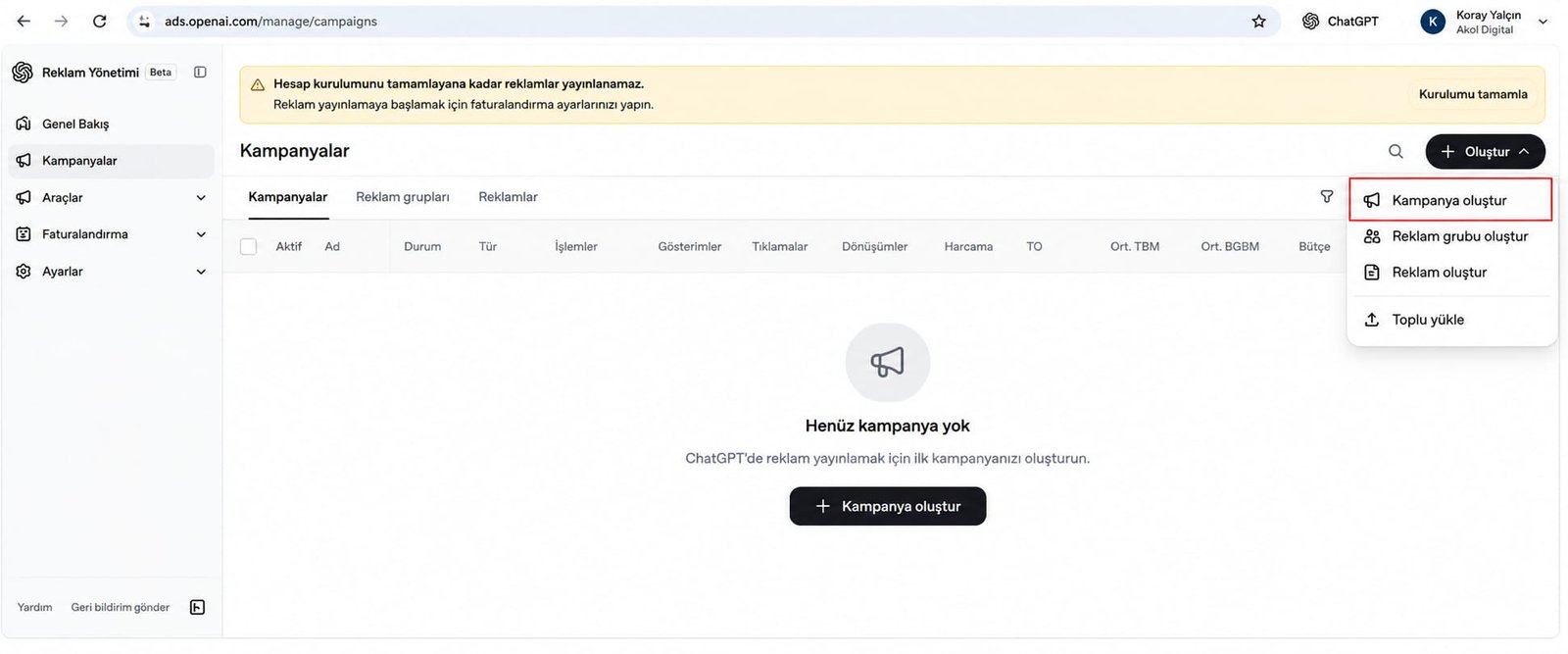
This menu offers four main options:
- Create campaign: Sets up the overarching framework that defines the objective, budget and geographic boundaries.
- Create ad group: A subset that holds topic targeting and audience definitions.
- Create ad: The stage where text and visual creatives are entered into the system.
- Bulk upload: Used to upload large numbers of ads in CSV or API format.
Step 3: Setting the Campaign Name and Naming Convention
Giving the campaign a clear naming taxonomy prevents confusion in reporting and CRM matching down the line. The name should explicitly state the domain, the target audience or the campaign purpose.
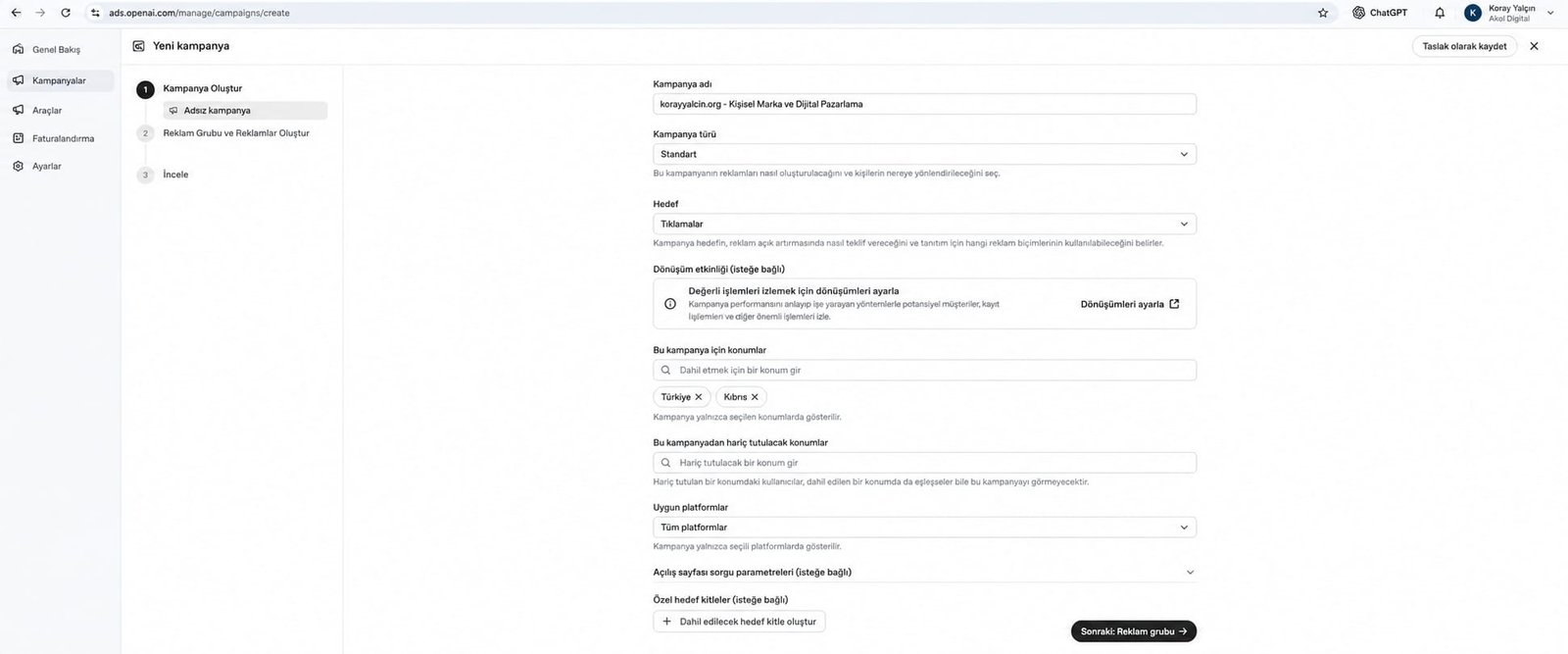
In the case study under review, the campaign name selected was korayyalcin.org - Personal Brand & Digital Marketing. This name identifies the target asset (korayyalcin.org), the focus theme (Personal Brand) and the industry vertical (Digital Marketing) at a glance.
Step 4: Selecting the Campaign Type (Standard)
On the OpenAI Ads platform, the Standard model is the preferred campaign type. The Standard campaign model delivers a balanced distribution of impressions across OpenAI’s desktop web interface, mobile web and search features.
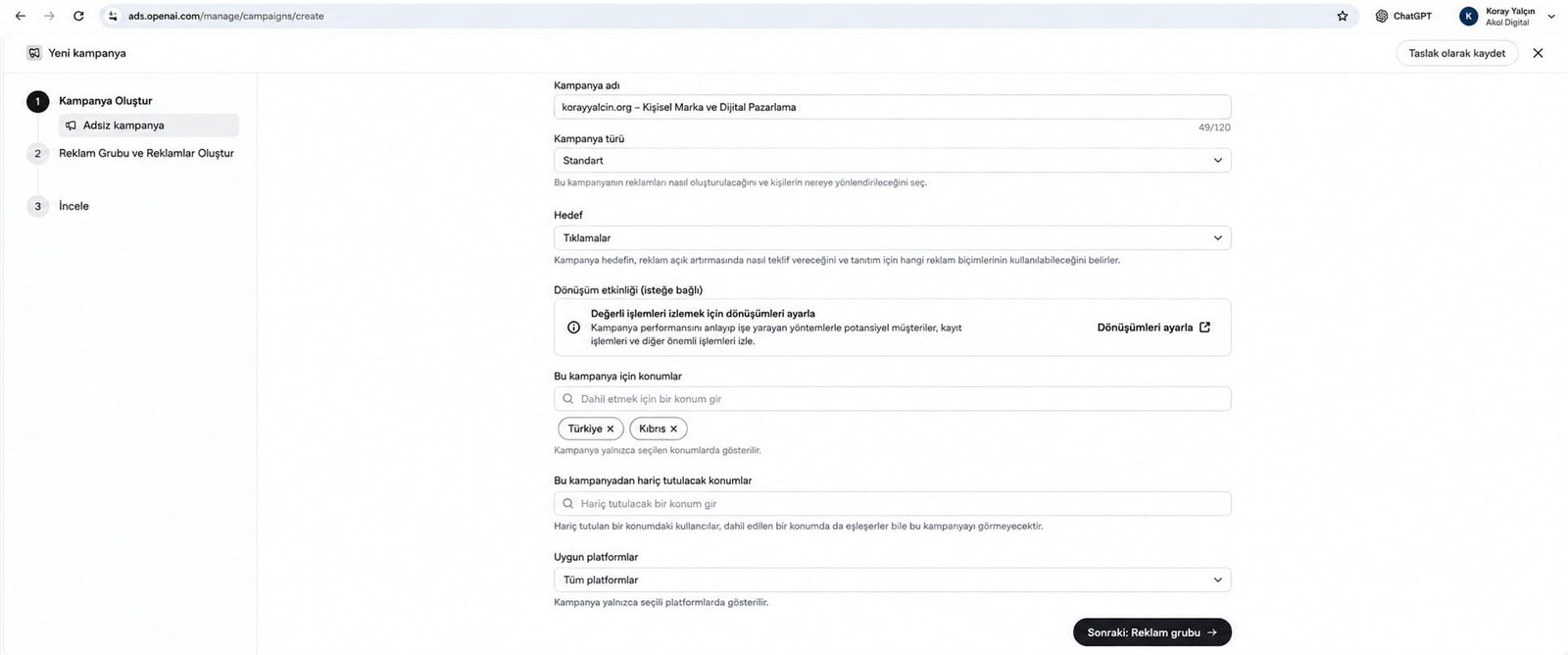
The Standard campaign type allows the OpenAI algorithm to optimize your budget across the chat sessions with the highest relevance.
Step 5: Setting the Campaign Objective (Clicks)
The campaign objective determines what the algorithm optimizes bids for in the auction. At the outset, the “Clicks” objective is selected to drive qualified traffic to the website or landing page.
When the Clicks objective is selected, the system serves the ad not merely to users who are likely to see it, but to the user profiles most likely to click the provided link and visit the landing page.
Step 6: Defining the Conversion Event (Conversion Tracking)
A conversion event is used to measure the valuable actions a user takes on the landing page after clicking the ad card (for example: submitting a form, tapping a WhatsApp button or downloading a PDF report).
By enabling the “Conversion event (optional)” setting on this screen, you can implement the OpenAI pixel code or a server-to-server conversion API on your website. This lets the dashboard report directly how many leads or sales your spend has generated.
Step 7: Configuring Geographic Targeting (Türkiye & Cyprus)
Geographic targeting ensures that your ads are served only to users in the countries where you operate or accept clients.
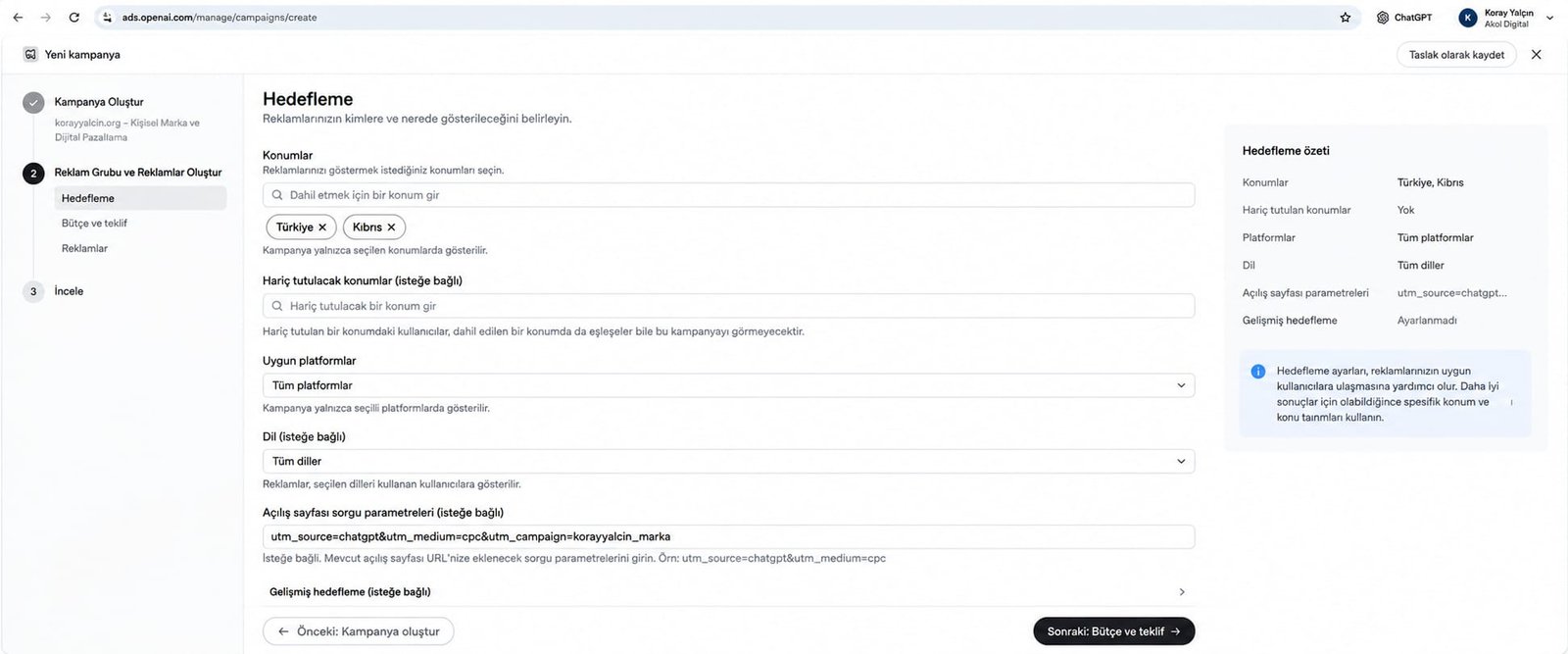
In our case study, Türkiye and Cyprus were selected in the Included locations field. This configuration enables direct reach to both business owners in the Turkish market and decision-makers in the Northern Cyprus real estate and investment ecosystem.
Step 8: Specifying Excluded Locations
The “Excluded locations (optional)” field is used to prevent budget from being spent in unproductive regions. Adding countries or specific regions you do not serve to this field blocks ad delivery there, even if the user speaks the language or is researching relevant topics.
Step 9: Eligible Platforms and Device Distribution (All Platforms)
In OpenAI Ads, the All platforms option is selected under the “Eligible platforms” setting. This option covers professionals using ChatGPT via desktop browsers, decision-makers asking questions through the iOS and Android mobile apps, and web search features.
Step 10: Target Language Settings (All Languages)
In the language selection field, you can leave the default All languages setting or restrict it to match your target market. ChatGPT users located in Türkiye and Cyprus sometimes ask technical or industry-specific questions in English. Keeping the language field set to “All languages” therefore allows you to capture foreign investors and multilingual professionals in Türkiye.
Step 11: Configuring Landing Page UTM Query Parameters
The “Landing page query parameters (optional)” field is used to clearly segment the traffic source in Google Analytics, Mixpanel and your CRM system.
The standard UTM structure applied in our case study is as follows:
utm_source=chatgpt&utm_medium=cpc&utm_campaign=korayyalcin_markaThis parameter string is automatically appended to the link the user clicks, ensuring that the source of every new lead in your CRM is tagged directly as chatgpt / cpc.
Step 12: Defining and Naming the Ad Group
An ad group is the structure that collects ads sharing common targeting and budget settings. The ad group name should reflect the targeted context.
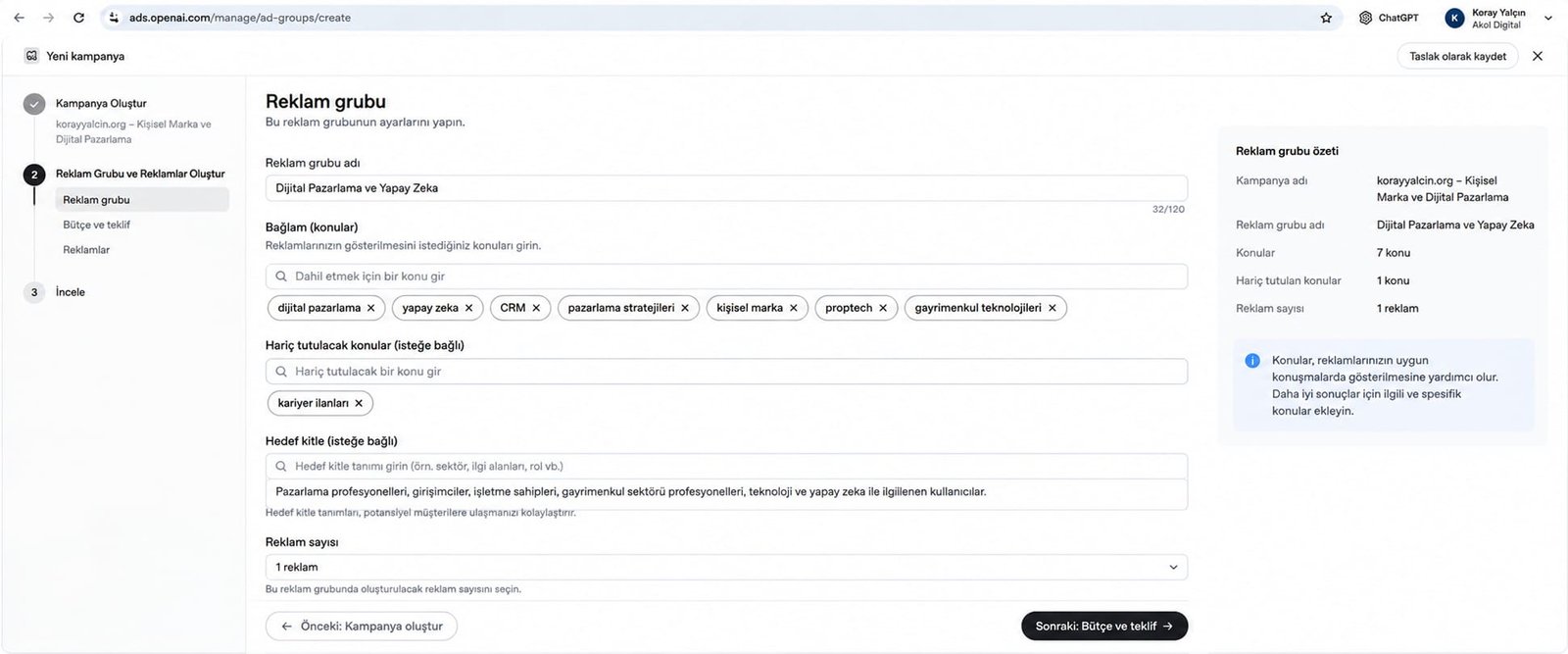
In the case study, the ad group was named Digital Marketing and Artificial Intelligence. This ad group contains all targeting built around digital transformation, AI integrations and growth systems.
Step 13: Contextual Topic (Topic/Context) Targeting
The backbone of targeting in OpenAI Ads is the “Context (topics)” field. The topics added here define the semantic axis of the user’s conversation with ChatGPT.
The 7 strategic topics selected in the sample campaign are:
digital marketingartificial intelligenceCRMmarketing strategiespersonal brandproptechreal estate technologies
With these topics, the system targets not just users having general conversations about AI, but professionals engaged in in-depth discussions about CRM integration, real estate technology or growth strategy.
Step 14: Negative Topic Targeting (Excluded Topics)
The most critical step in budget optimization is negative topic filtering. Contexts that do not align with your business model are added to the “Excluded topics (optional)” field.
In our case study, job listings was added to this field as a negative topic. As a result, ads are not shown in the sessions of ChatGPT users discussing topics such as “digital marketing job openings,” “looking for an internship” or “writing a CV,” and the budget is directed solely to commercial users with potential demand for services and consulting.
Step 15: Entering the Text-Based Target Audience Definition
Going beyond traditional checkboxes, OpenAI Ads features a “Target audience (optional)” free-text field that leverages the natural language understanding capabilities of AI.
The audience definition entered in the sample campaign is as follows:
“Marketing professionals, entrepreneurs, business owners, real estate professionals, and users interested in technology and artificial intelligence.”
The OpenAI algorithm processes this text as a semantic guide and uses it to assess whether the tone of the conversation and the user’s level of professional depth match this audience profile.
Step 16: Setting the Number of Ads per Ad Group
The “Number of ads” dropdown under the ad group settings determines how many different creative variations will rotate within this group. The soundest approach is to start with 1 ad during the initial testing phase to measure the creative’s standalone performance, and then add new variations for A/B testing.
Step 17: Selecting the Budget Type: Daily Budget vs. Lifetime Budget
Two core options are offered for budget management: Daily budget and Lifetime budget.
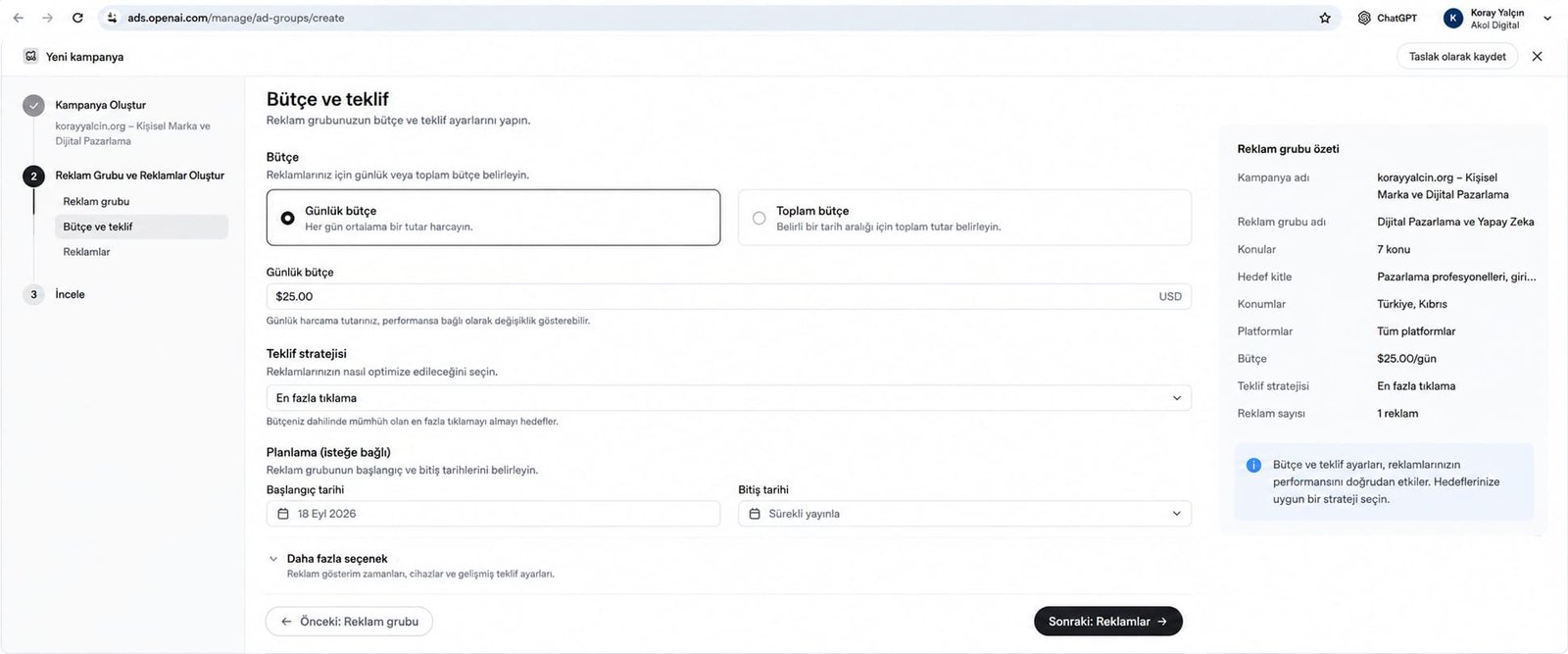
- Daily budget: The amount targeted to be spent on average each day. Preferred for always-on campaigns.
- Lifetime budget: The total spending cap for a specific date range (for example, for the duration of an event or product launch).
Step 18: Setting the Budget Amount
In the case study under review, a daily budget of $25.00 USD was entered.
[!IMPORTANT] Important Budget Notice: The $25.00/day amount is not a universal minimum threshold for OpenAI Ads. It is a sample daily budget set for the personal brand and growth architecture test campaign under review. On the OpenAI Ads platform, budgets can be configured flexibly based on the size of the target market and the level of competition in the industry.
Step 19: Setting the Bidding Strategy (Maximize Clicks)
“Maximize clicks” was selected as the bidding strategy. Under this strategy, the OpenAI auction engine aims to secure the highest possible number of valid, qualified clicks within the set daily budget.
Step 20: Campaign Scheduling and Start/End Dates
In the campaign scheduling section, Sep 18, 2026 was selected as the start date, and the end date was set to Run continuously. The continuous delivery model allows the algorithm to collect data steadily without interrupting its learning phase.
Step 21: Writing the Ad Creative, Headline and Description Copy
The ad creation screen is where you define the text and visual components users will see.
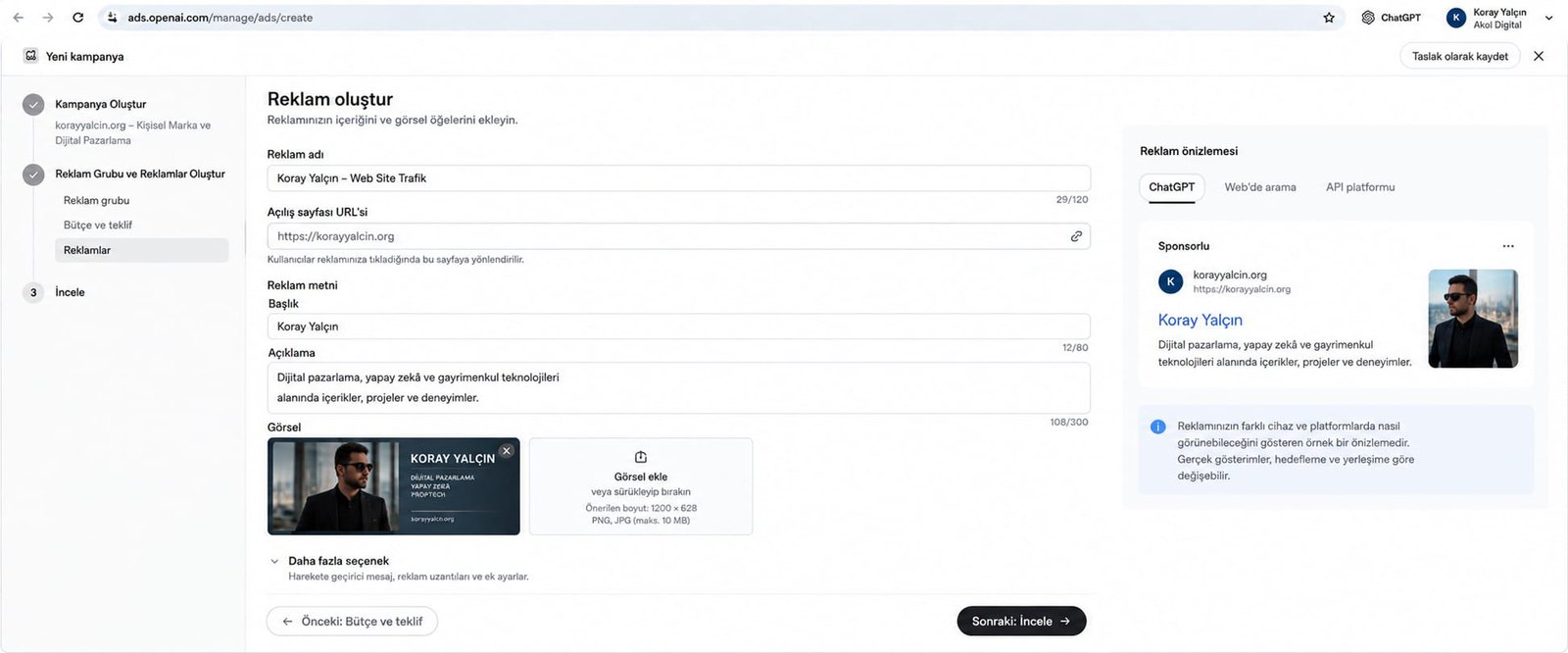
Copy parameters from our case study:
- Ad name:
Koray Yalçın - Website Traffic - Landing page URL:
https://korayyalcin.org - Headline (Maximum 80 characters):
Koray Yalçın(12 characters used) - Description (Maximum 300 characters):
Content, projects and experience in digital marketing, artificial intelligence and real estate technology.(105 characters used)
Copy that avoids exaggerated promises and adopts a clear, professional tone summarizing the solution the user is looking for speeds up the approval process and improves click quality.
Step 22: Visual Creative Standards and Uploading
The image is the single most important element in making the ad card stand out. The visual specifications of the OpenAI Ads platform are as follows:
- Recommended size:
1200 x 628pixels (1.91:1 aspect ratio) - Supported formats: PNG, JPG
- Maximum file size: 10 MB
- Content Standard: High-resolution designs aligned with the brand’s corporate identity, free of oversized text or misleading button graphics.
Step 23: Ad Preview and Review
Before saving the ad, use the preview tab in the right-hand panel to check how the ad will appear across different environments:
- ChatGPT: How it appears within the chat flow.
- Web search: Result placement in search engine mode.
- API platform: Card appearance in partner integrations.
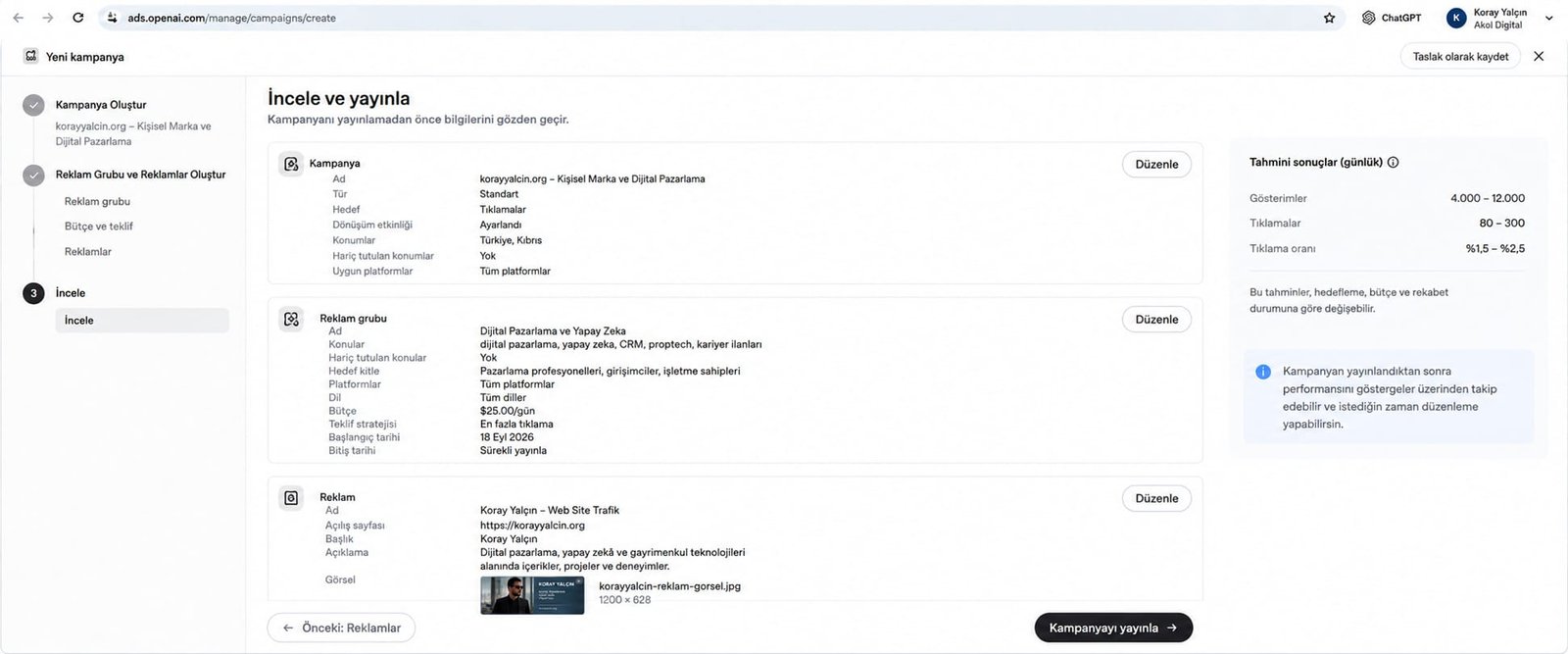
On this screen, the dashboard presents Estimated Results (daily) based on the $25/day budget entered and the targeting selected:
- Impressions:
4,000 - 12,000 - Clicks:
80 - 300 - Click-through rate (CTR):
1.5% - 2.5%
Step 24: OpenAI Advertising Policy Compliance Check and Launch
In the final step, all campaign settings are reviewed, the OpenAI Advertising Policy is accepted and the campaign is launched.
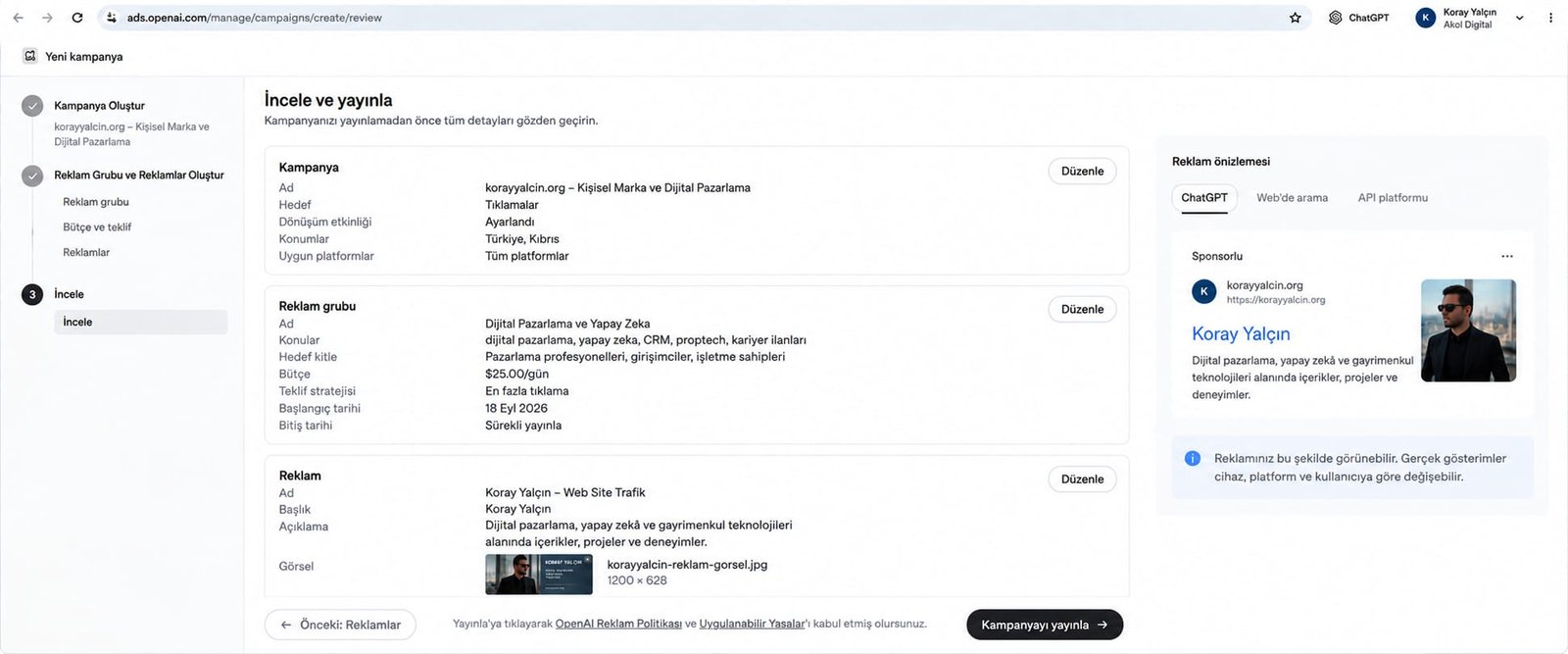
Once you click the “Publish campaign” button, the ad enters the OpenAI review queue. Policy-compliant ads typically go live within a few hours and begin appearing in ChatGPT users’ sessions.
Contextual Targeting and Topic Selection Strategy
Success with ChatGPT ads depends less on traditional “keyword hunting” and more on building the right semantic cluster.
                  +--------------------------+
                  |  TARGET AUDIENCE         |
                  |  FREE-TEXT DEFINITION    |
                  |  (Marketing Professional,|
                  |  Entrepreneur, Investor) |
                  +------------+-------------+
                               |
            +------------------+------------------+
            |                                     |
            v                                     v
+-----------------------+             +-----------------------+
| POSITIVE CONTEXTUAL   |             | NEGATIVE CONTEXT      |
| TOPICS (7 Topics):    |             | (Excluded):           |
| • digital marketing   |             | • job listings        |
| • artificial intel.   |             |   (Job/internship     |
| • CRM                 |             |    seekers filtered,  |
| • marketing strategy  |             |    budget protected)  |
| • personal brand      |             +-----------------------+
| • proptech            |
| • real estate tech    |
+-----------------------+
1. The Logic Behind the Topic Combination
The 7 topics selected in our case study were not chosen at random:
- Core Disciplines:
digital marketing,marketing strategies-> Captures general marketing leaders. - Technology Layer:
artificial intelligence,CRM-> Attracts decision-makers looking for process automation and software. - Industry Vertical:
proptech,real estate technologies-> Focuses on real estate developers and investors. - Authority and Positioning:
personal brand-> Filters for an audience seeking consulting and strategic guidance.
2. The Importance of Negative Topic Filtering
Excluding the job listings topic protects roughly 30–40% of the ad budget from waste. Users asking ChatGPT questions such as “How do I find a job in the digital marketing industry?” or “Where can I do an internship at a real estate company?” are not at the stage of purchasing a commercial service. Adding a negative topic prevents the ad card from being triggered in these conversations.
Analysis of Budget, Bidding, and Estimated Results
The forecasting engine provided by the OpenAI Ads dashboard transparently models the relationship between campaign budget and the traffic it will generate.
Projection based on the $25.00/day test budget in our case study:
| Metric | Lower Estimate | Upper Estimate | Average / Expected |
|---|---|---|---|
| Daily Budget | $25.00 | $25.00 | $25.00 / day |
| Daily Impressions | 4,000 | 12,000 | 8,000 impressions |
| Daily Clicks | 80 | 300 | 190 clicks |
| Estimated Click-Through Rate (CTR) | 1.50% | 2.50% | 2.00% |
| Estimated Cost Per Click (CPC) | $0.08 ($25 / 300) | $0.31 ($25 / 80) | ~$0.13 ($25 / 190) |
This projection shows that ChatGPT ads offer an exceptionally attractive CPC (Cost Per Click), particularly for B2B and high-value sectors (e.g., real estate and enterprise software). While CPCs on the traditional Google Search Network range from $2 to $10 for keywords such as “real estate CRM” or “digital marketing consultant,” a range of $0.08–$0.31 on ChatGPT represents a significant arbitrage opportunity for early-adopter brands.
Post-Campaign Performance and Reporting Analysis
After the campaign went live, 30 days of actual performance data were collected and validated in the dashboard against the forecast models.
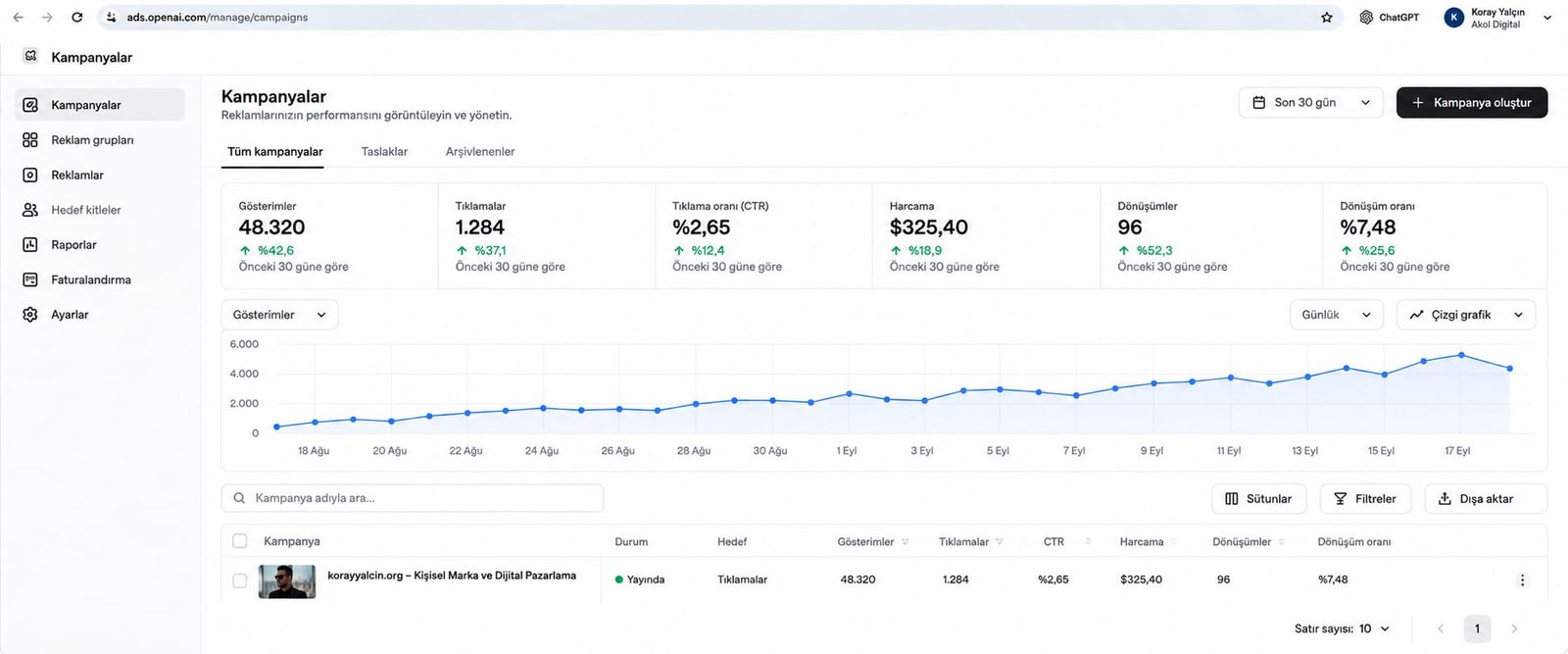
Detailed Analysis of Actual Results
- Impressions: 48,320 (↑ 42.6% vs. previous 30 days)
- Shows that the 7 targeted contextual topics have stable query volume across Turkey and Cyprus.
- Clicks: 1,284 (↑ 37.1% vs. previous 30 days)
- 1,284 high-intent professional visitors were directed to the website in a single month.
- Click-Through Rate (CTR): 2.65% (↑ 12.4% vs. previous 30 days)
- This exceeded even the dashboard’s upper estimate of 2.50%. It demonstrates that the ad headline, description, and image were highly aligned with the context of the user’s question.
- Total Spend: $325.40 (↑ 18.9% vs. previous 30 days)
- Actual Average CPC:
$325.40 / 1,284 = $0.253(approximately 25 cents). This landed squarely within the forecast range of $0.08–$0.31.
- Actual Average CPC:
- Conversions: 96 (↑ 52.3% vs. previous 30 days)
- Of the 1,284 website visitors, 96 converted into leads by filling out a form, downloading a report, or initiating contact.
- Cost Per Acquisition (CPA):
$325.40 / 96 = $3.39. For a qualified B2B / real estate lead, $3.39 is an extremely competitive cost.
- Conversion Rate (CR): 7.48% (↑ 25.6% vs. previous 30 days)
- A conversion rate well above website averages was achieved. This metric confirms that traffic from ChatGPT is not ordinary social media traffic, but consists of qualified decision-makers focused directly on finding a solution.
CRM and Sales Funnel Integration for ChatGPT Ads
Without a professional sales architecture (Lead-to-Sale System) behind them, the clicks generated by ChatGPT ads remain nothing more than website traffic. Real commercial growth happens when the click flows into the CRM and the sales team takes action.
flowchart TD
    A["ChatGPT User Conversation (Prompt Intent)"] --> B["Sponsored Card Impression"]
    B --> C["Click & Landing Page (UTM Parameters)"]
    C --> D["Web Form Submission (Lead Capture)"]
    D --> E["CRM Automation (Bitrix24 / HubSpot)"]
    E --> F{"AI Lead Scoring (0 - 100)"}
    F -->|"70 - 100 Points (Hot)"| G["Immediate Sales Team Call (<5 Min)"]
    F -->|"40 - 69 Points (Warm)"| H["WhatsApp Nurturing & Case Study Sharing"]
    F -->|"0 - 39 Points (Cold)"| I["Weekly Email Newsletter Flow"]
The 4 Pillars of Lead-to-Sale Integration
- Capturing UTM and Campaign Context (Hidden Fields):
The user’s private conversation text in the ChatGPT interface is not passed directly to the website. Instead, the contextual intent group and campaign information defined by the advertiser in the dashboard are carried to the landing page via the
utm_source=chatgpt,utm_medium=cpc,utm_campaign, andutm_contentURL tags. JavaScript on the page reads these parameters and records them in the CRM through hidden form fields. - Automatic Duplicate Checking in the CRM (De-duplication): The incoming lead’s email address or phone number is checked against the system. If the lead has submitted information before, their existing record is updated; if they are new, they are assigned to the appropriate sales representative.
- AI-Powered Lead Scoring: The CRM automation combines the campaign/intent context the lead came from with the data the user self-reported in the landing page form (budget range, company size, investment timeline) to assign a priority score between 0 and 100.
- Rapid Response Standard (Speed to Lead): Time to first contact with a lead (speed-to-lead) is tracked as an operational metric based on the time difference between the submission timestamp and the first call log in the CRM. This measurement serves as the benchmark for monitoring call response times, real-time notification triggers, and representative assignment protocols.
How Ads Appear in Live User Conversations (3 Real Case Studies)
The placement of OpenAI Ads within the chat interface adapts dynamically to the user’s question and the context of the conversation. The following 3 real cases illustrate how the ad is positioned across different scenarios.
Case 1: Real Estate Investment Context (TOFU / MOFU)
The user is researching real estate investment opportunities in the Northern Cyprus market.
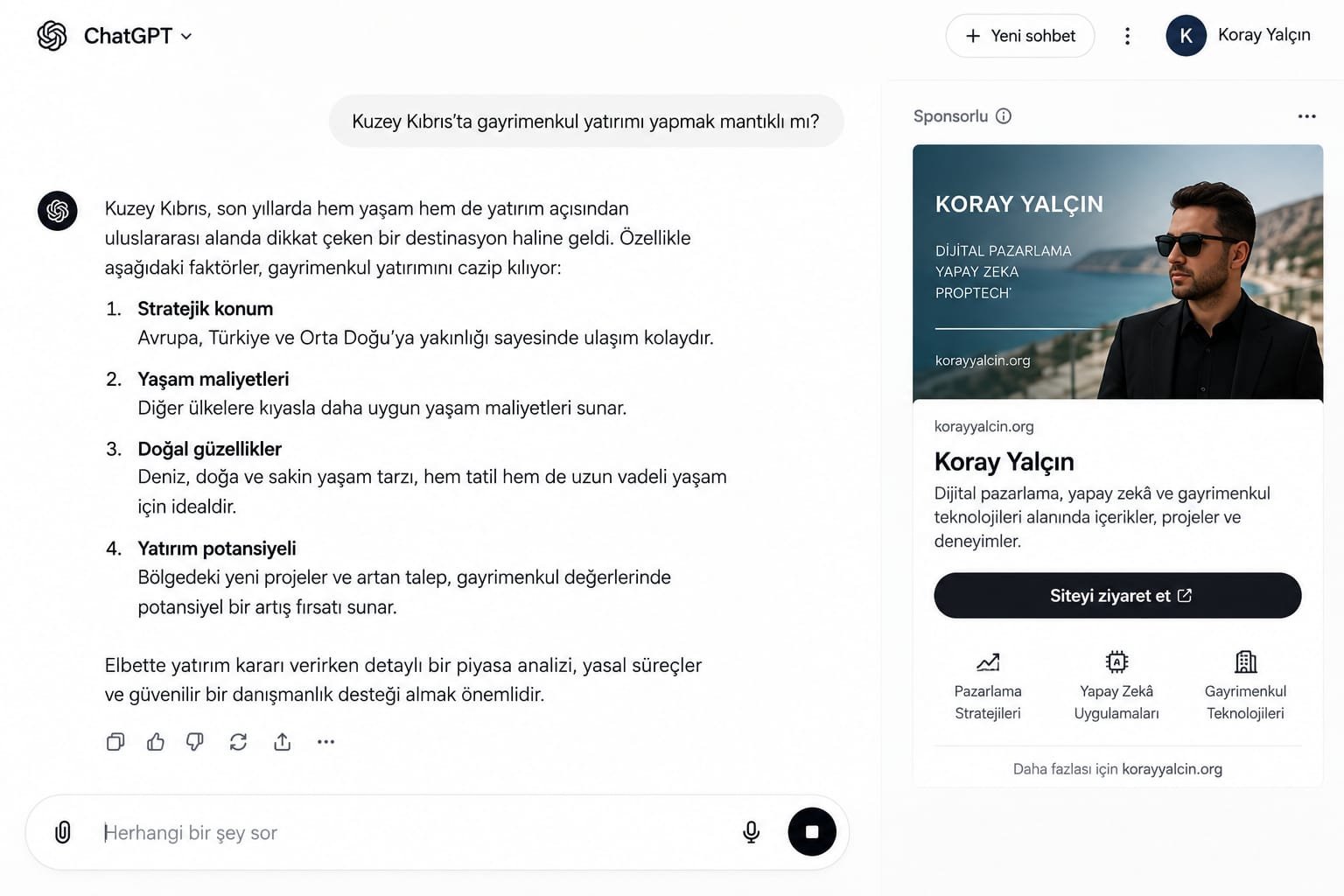
- User Prompt: “Does it make sense to invest in real estate in Northern Cyprus?”
- ChatGPT Organic Response: Provides an objective market analysis under the headings of strategic location, cost of living, natural beauty, and investment potential.
- Sponsored Ad Placement: Positioned as a vertical card immediately to the right of the response. It features an image, the
korayyalcin.orgdomain, the headline “Koray Yalçın”, description text, a “Visit site” button, and beneath it the tags Marketing Strategies, AI Applications, and Real Estate Technologies. - Analysis: While still evaluating the investment decision, the user gains the opportunity to connect directly with a real estate technology and growth expert in the region.
Case 2: AI & Digital Marketing Context (MOFU)
The user is researching how to use AI in their business processes.
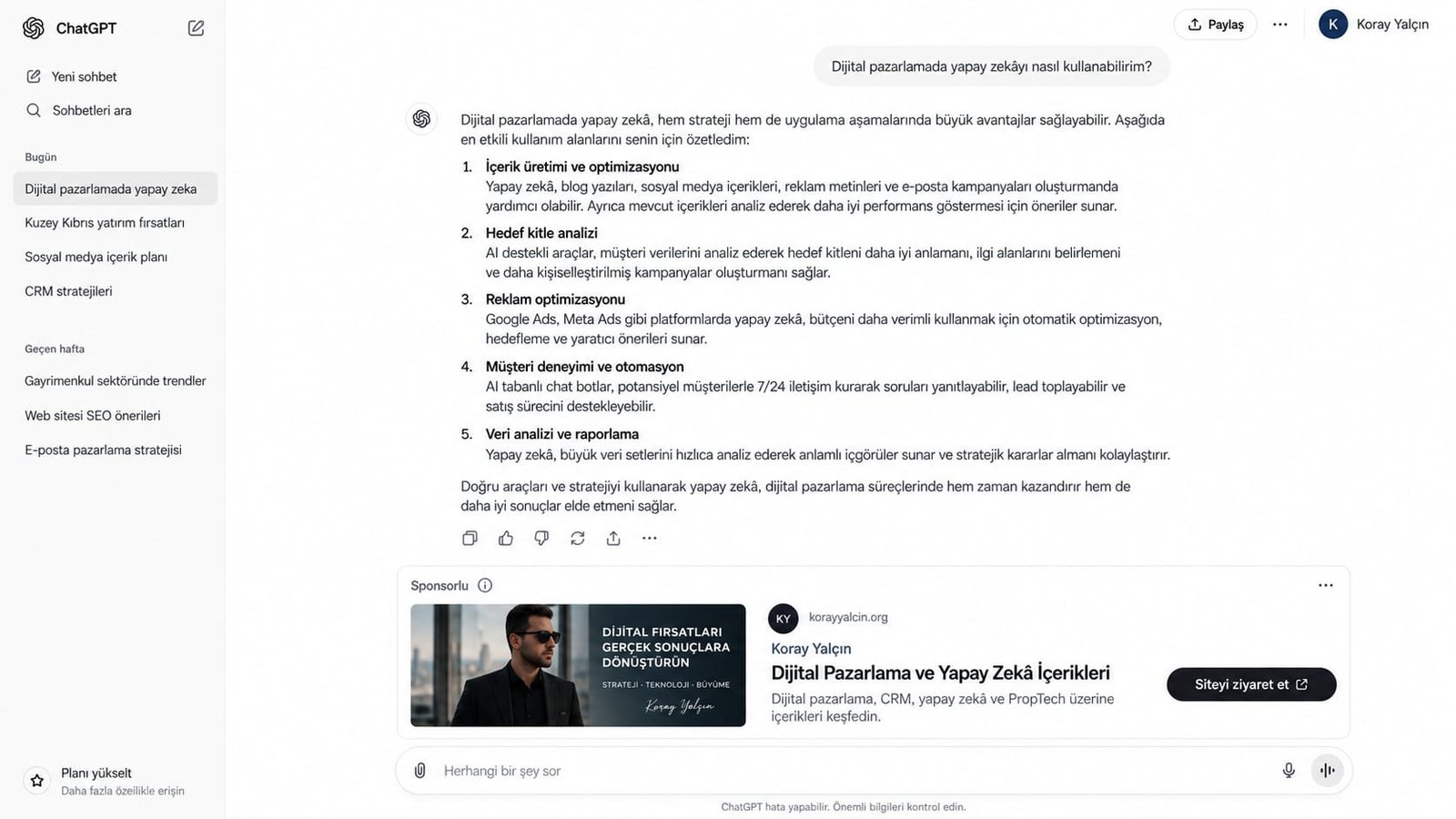
- User Prompt: “How can I use AI in digital marketing?”
- ChatGPT Organic Response: Lists the steps of content creation, audience analysis, ad optimization, customer experience, and data analysis.
- Sponsored Ad Placement: Positioned directly below the response as a wide horizontal banner. On the left is the creative image “TURN DIGITAL OPPORTUNITIES INTO REAL RESULTS - STRATEGY · TECHNOLOGY · GROWTH”, and on the right is the headline “Digital Marketing and AI Content” along with a “Visit site” button.
- Analysis: While reading theoretical advice, the user can access, in a single click, the guides and case studies of an expert who actually puts that advice into practice.
Case 3: CRM & AI Lead Scoring Context (BOFU / High-Stakes Decision Moment)
The user is looking for a concrete solution to resolve a direct operational bottleneck.
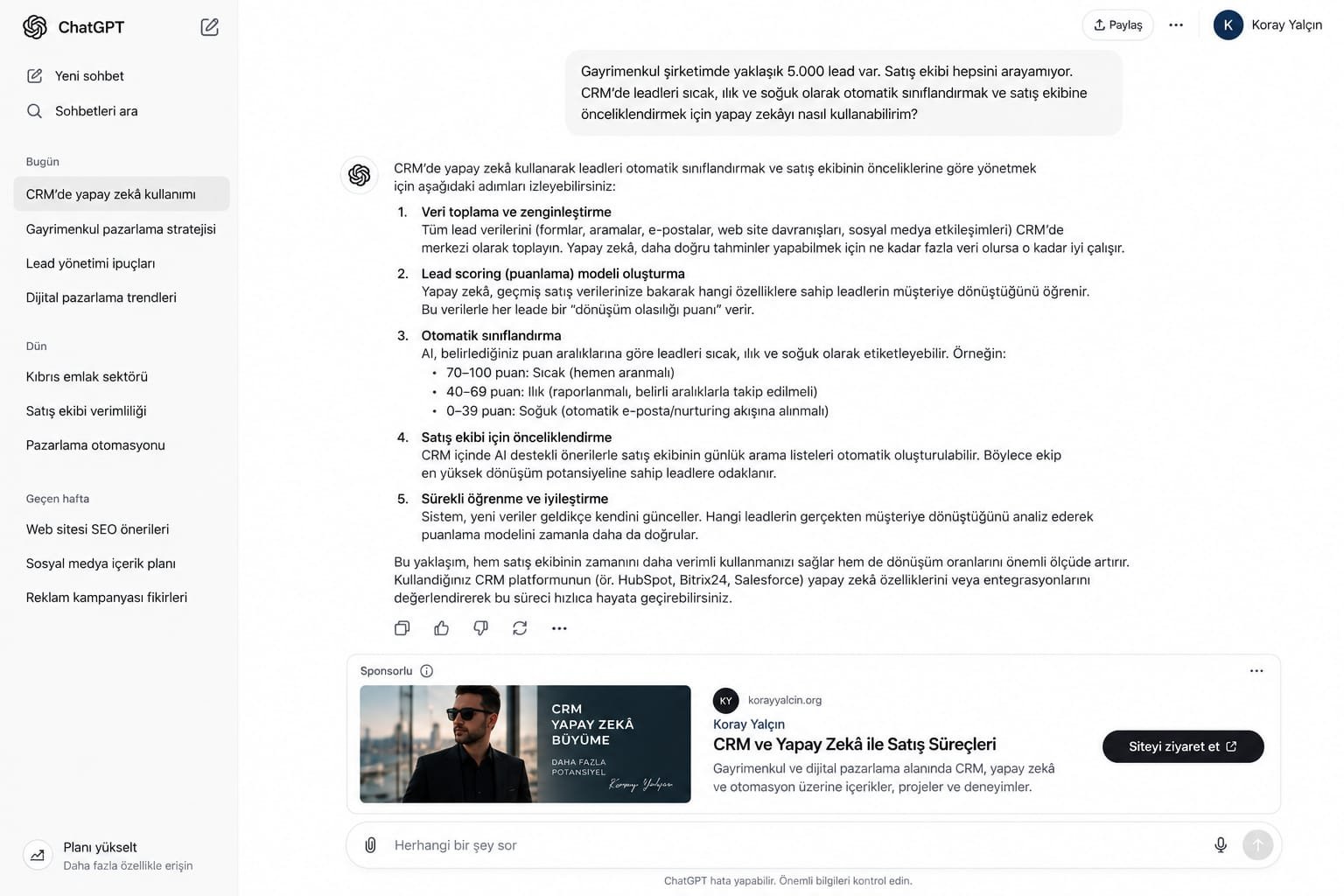
- User Prompt: “My real estate company has about 5,000 leads. The sales team can’t call all of them. How can I use AI to automatically classify leads in the CRM as hot, warm, and cold, and prioritize them for the sales team?”
- ChatGPT Organic Response: Explains the methodology for data collection, building a lead scoring model, automatic classification, and sales team prioritization.
- Sponsored Ad Placement: Directly below the response, a sponsored card titled “Sales Processes with CRM and AI” appears, accompanied by the image “CRM AI Growth - More Potential”.
- Analysis: This is the single most valuable conversion moment for a B2B consultancy (Zero Moment of Truth). At the exact moment a business owner or sales director is experiencing this problem, they are directed straight to a growth architect who specializes in this very area.
10 Common Mistakes and How to Fix Them
- Thinking in Terms of Traditional Keyword Logic: Mistake: Focusing on individual keywords while ignoring the flow of the conversation. Solution: Model the problem scenarios in which users ask questions, and use broad contextual topics and free-text audience descriptions.
- Leaving Negative Topic Filtering Empty:
Mistake: Serving ads on irrelevant academic, homework, or job-search queries and draining the budget.
Solution: Add topics such as
job listings,internships, andacademic thesesto your negative list from day one. - Leaving UTM Parameters Incomplete: Mistake: Running ads without knowing where your traffic is coming from. Solution: Define the complete UTM string in the query parameters field of the OpenAI Ads dashboard.
- Sending Traffic to a Generic Homepage: Mistake: Mentioning CRM and AI in the ad, then sending users to an unrelated corporate homepage. Solution: Design dedicated landing pages that directly answer the question the user asked.
- Mistaking the $25/Day Budget for a Mandatory Minimum: Mistake: Assuming $25/day is the platform’s official minimum and avoiding small-budget tests. Solution: $25/day is the test budget chosen for this specific case study. Adjust your budget to fit the size of your own industry.
- Focusing Only on Click Volume (Vanity Metrics): Mistake: Celebrating click counts without measuring the quality of leads that reach your CRM. Solution: Track Customer Acquisition Cost (CAC) and Lead-to-Sale Rate (Lead-to-Sale %) alongside CPC.
- Using Text-Heavy, Low-Resolution Images: Mistake: Uploading images that don’t meet the 1200x628 size standard or are cluttered with poster-style text. Solution: Choose minimalist, professional, high-contrast corporate designs.
- Neglecting the Free-Text Audience Field: Mistake: Leaving the natural-language audience description blank, even though it is one of the system’s greatest strengths. Solution: Clearly describe the job titles, industries, and decision-maker roles you are targeting.
- Assuming the AI’s Organic Recommendation Is “Guaranteed”: Mistake: Believing that once you advertise, ChatGPT will praise your company as “the best company” in its organic answers. Solution: Ads and organic responses are completely independent. Ads appear only as sponsored cards, and organic neutrality is preserved.
- Failing to Set Up a Speed-to-Lead Process: Mistake: Calling a warm lead from ChatGPT two days later. Solution: Use CRM automation to place a call or trigger an automated WhatsApp welcome flow within the first five minutes.
Frequently Asked Questions
1. Is it possible to advertise on ChatGPT?
Yes. Through OpenAI Ads (ads.openai.com), the platform launched by OpenAI, you can run sponsored ads within the ChatGPT chat interface. Ads appear as sponsored cards directly beside or below the response, based on the context of the user’s prompt.
2. What is OpenAI Ads?
OpenAI Ads is the official ad management platform that lets brands serve sponsored content, links, and visual cards in interfaces across ChatGPT and the OpenAI ecosystem, matched to users’ conversational context and intent.
3. How do ChatGPT ads differ from search network ads?
Traditional search network ads, such as Google Ads, rely on individual keyword matching (keyword auction). ChatGPT ads are targeted based on the user’s multi-turn conversational context and the semantic intent within the prompt (prompt-intent). Instead of scanning a passive list of search results, the user encounters a relevant sponsored solution while actively solving a problem.
4. What is the minimum budget for advertising on ChatGPT?
OpenAI Ads does not impose a strict universal minimum budget. Campaigns can use either a daily budget or a lifetime budget. The case study in this guide uses a $25.00/day budget for testing purposes, but budgets can be scaled according to the target industry, competition, and target geography.
5. What targeting options are available for ChatGPT ads?
OpenAI Ads offers geographic location targeting (country-level inclusion/exclusion), language options, eligible platforms, contextual topics (topics/context), negative topic exclusions, and a free-text description of target audience intent.
6. How does negative targeting work in ChatGPT ads?
Negative targeting is applied by adding irrelevant concepts to the “Topics to exclude (optional)” field in the ad group settings. For example, in a B2B marketing campaign, adding “job listings” as a negative topic prevents ads from appearing in job seekers’ conversations and avoids wasted budget.
7. Are ChatGPT ads prompt-based or keyword-based?
ChatGPT ads are prompt-based and focused on semantic context. Rather than matching only a single word the user types, the system performs vector-based matching against the entire conversation, the problem the user is trying to solve, and the contextual topics defined in the ad group.
8. Which ad formats do ChatGPT ads support?
OpenAI Ads supports a sponsored native card format that includes a headline (maximum 80 characters), description text (maximum 300 characters), a destination landing page URL, and a horizontal image with a recommended size of 1200x628 pixels.
9. Are ChatGPT ads shown to free users or Plus subscribers?
Under OpenAI’s platform policies, ad impressions are served primarily in free-tier user sessions and in web search/search engine integration scenarios. Ad display rules for Enterprise and paid subscriptions are subject to OpenAI’s current privacy and subscription terms.
10. How do you track UTMs in ChatGPT ads?
Enter the UTM string in the “Landing page query parameters” field of the OpenAI Ads dashboard (for example: utm_source=chatgpt&utm_medium=cpc&utm_campaign=campaign_name). These parameters are automatically appended to every ad URL, so traffic sources can be clearly segmented in Google Analytics and your CRM.
11. How do you set up conversion tracking for ChatGPT ads?
During campaign creation, use the “Conversion event” option to track valuable user actions such as form submissions, appointment requests, and sales. Tracking runs through the OpenAI tracking pixel installed on your website or through a server-side event API.
12. Can ChatGPT ads replace Google Ads?
Rather than directly replacing Google Ads, ChatGPT ads are a complementary channel that captures the most valuable research and decision-making moments in the search funnel. On Google, users browse lists of links. On ChatGPT, they seek synthesized information, so in-conversation ads reach them at a moment of deeper intent.
13. How do ChatGPT ads differ from Meta Ads?
Meta Ads deliver “interruption marketing” based on the user’s past interests and demographic profile. ChatGPT ads deliver “pull marketing” (pull/intent marketing) based on the question and need the user is actively expressing at that moment. As a result, post-click intent quality is generally higher.
14. Are ChatGPT ads suitable for B2B?
Yes. In B2B marketing, decision-makers rely heavily on ChatGPT to ask strategic questions, conduct market research, and make technology choices. When you target the right contextual topics (CRM, digital marketing, enterprise software, etc.), B2B lead quality is highly satisfactory.
15. How can ChatGPT ads be used in the real estate industry?
Real estate developers and consultants can present sponsored project and advisory cards directly to high-income, investment-minded users asking about residential investment, regional payback periods, real estate technologies, or portfolio management.
16. What is the estimated CTR (click-through rate) for ChatGPT ads?
Based on the estimated results in the OpenAI Ads dashboard, CTR is projected at 1.5% to 2.5%, depending on industry and targeting. In the real-world case data we analyzed, the campaign achieved a 2.65% CTR, showing that results can exceed the upper end of the estimate.
17. What is the average CPC (cost per click) for ChatGPT ads?
CPC varies with the level of competition in the target market. In our dashboard case study, $325.40 in spend generated 1,284 clicks, for an average CPC of roughly $0.25 (25 cents). The estimated range is $0.08–$0.31.
18. What image size should be used for ChatGPT ads?
The recommended image size for OpenAI Ads is 1200 x 628 pixels (approximately a 1.91:1 aspect ratio). Supported formats are PNG and JPG, with a maximum file size of 10 MB. Images should be sharp and professional, without excessive text.
19. How long does the ChatGPT ad approval process take?
Once created, campaigns and ad creatives go through automated review, plus manual review where needed, in line with OpenAI’s Advertising Policies. Approval usually takes anywhere from a few hours to 24 hours.
20. Which industries are restricted in ChatGPT ads?
Under OpenAI’s Advertising Policies, campaigns involving misleading financial claims, illegal products and services, tobacco and drugs, copyright infringement, adult content, or hate speech are strictly prohibited.
21. How do you connect ChatGPT ads to a CRM system?
Hidden fields in the web form capture the UTM parameters appended to the landing page. When the form is submitted, the data is passed via webhook or direct API to CRM systems such as Bitrix24, HubSpot, or Salesforce, and the lead source is tagged as “chatgpt / cpc.”
22. How is lead scoring applied to ChatGPT ads?
Prospects arriving through ChatGPT are automatically scored (0–100 points) within the CRM based on the depth of their prompt and the budget/need criteria they provide in the form. Prospects who arrive with high-intent questions are flagged as “Hot Leads” and assigned to the sales team as a priority.
23. How can ChatGPT ads help grow a personal brand?
By appearing directly as an authority figure to users asking professional questions in your area of expertise (for example, digital marketing, CRM, or real estate architecture), you can drive qualified traffic to your website and publications and strengthen how your industry perceives you.
24. Do ChatGPT ads affect the AI’s organic responses?
No. Under OpenAI’s clear principles, sponsored ads do not alter or manipulate the AI model’s organic response. Ads are presented as separate cards, independent of the organic answer, and clearly labeled “Sponsored.”
25. What developments are expected for the future of ChatGPT ads?
Expected future developments include in-conversation form completion (conversational lead forms), voice ad integrations, smart bidding models that interact dynamically with an AI agent, and deeper closed-loop CRM API integrations.
Sources and Author Information
About the Author
Koray Yalçın is a Digital Marketing and CRM Consultant who advises on digital marketing, CRM architectures, customer journeys, marketing automation, and AI-powered solutions. He is the author of research monographs registered on CERN Zenodo and of published industry books.
- Official Website: korayyalcin.org
- Wikidata Entity: Q141467418
- ORCID: 0009-0005-0907-9370
- Google Scholar: qv8Ug-oAAAAJ
- Last Updated: September 19, 2026
Primary Sources and Official Documentation
- OpenAI Ads Management Platform Documentation: ads.openai.com
- OpenAI Advertising Policies and Guidelines: openai.com/policies