Executive Summary
In this system architecture, we build the technical integration infrastructure that connects the Meta Ads, CRM software, and WhatsApp Business API layers end to end—optimizing speed and reducing data loss to 0%.
Who Is This For?
Growth leaders who want to see how ad budgets translate into CRM outcomes, automate their lead capture processes, and accelerate their sales teams.
Key Concepts
- Data Mapping: Matching the fields in an ad form to the correct columns in the CRM database (e.g., Phone -> Phone).
- Webhook: A method of sending a real-time HTTP POST data payload to another system when an event occurs in one system (e.g., when a form is submitted).
- Make: An automation platform that connects systems to one another without writing code.
The Problem
In most businesses, leads from Meta ads are manually downloaded from the Meta dashboard and distributed to reps via Excel or WhatsApp groups. Lead data gets lost along the way, and time to first call stretches into hours or even days. On top of that, because the ad manager cannot see which form led to a sale, campaigns are optimized blindly.
Analysis
Routing raw data directly into the CRM through automation layers such as Make or Zapier cuts data transfer latency to under 1 second. Notifying sales reps of auto-assigned leads instantly via SMS/WhatsApp reinforces a “speed-to-lead” reflex.
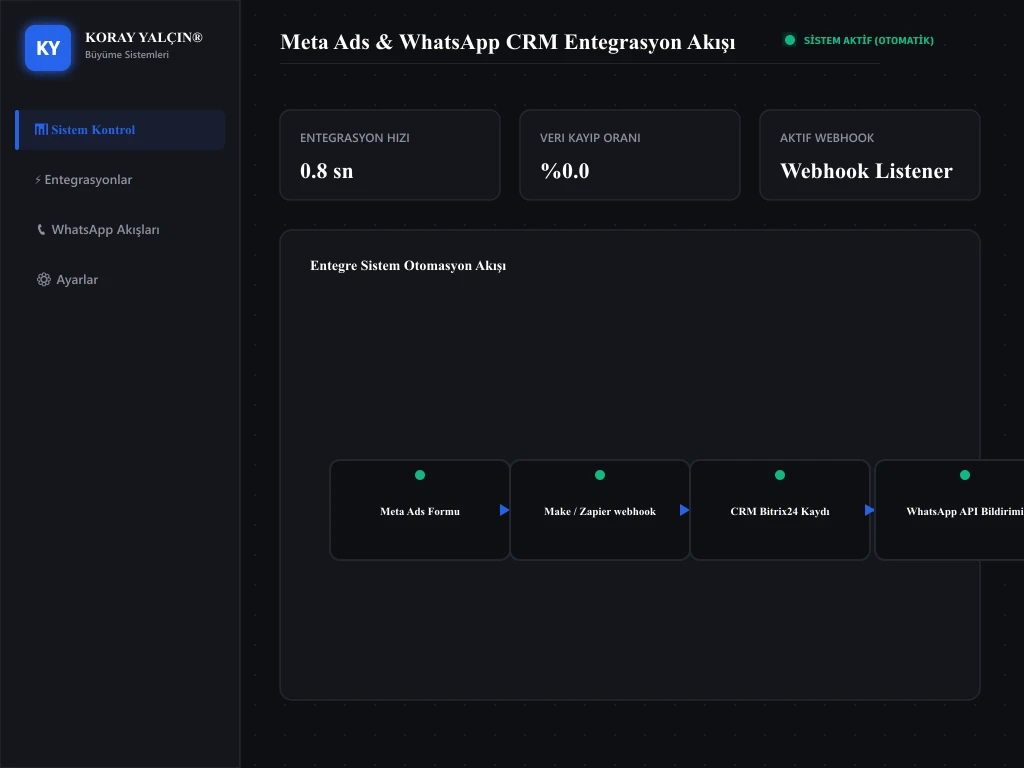
Proposed System
Meta → Make → CRM → WhatsApp API Growth Architecture:
graph TD
    A[Meta Ad Click] --> B[Meta Lead Form Submission]
    B --> C[Make Webhook Receiver]
    C --> D[CRM New Lead Record & Deduplication Check]
    D --> E[Smart Rep Assignment]
    D --> F[WhatsApp API First-Response Template]
F --> G[Customer Reply / Chatbot]- Step 1 (Meta Ads): The prospect fills out the form.
- Step 2 (Make): Captures the data instantly and standardizes the phone number (converts it to the +90 format).
- Step 3 (CRM): Runs a duplicate check; if no existing record is found, it creates a new card and assigns it to the relevant rep.
- Step 4 (WhatsApp API): Sends the customer an instant, pre-approved template message containing the PDF brochure.
Implementation Steps
- Step 1: Connect your ad account in Meta Business Suite to the Make platform.
- Step 2: In your Make scenario, add the “Create Lead in Bitrix24” module next to the “Watch Lead Ads” module and map the data fields.
- Step 3: Add your WhatsApp Business API provider’s (e.g., Twilio or Edna.io) HTTP API module to the Make flow. For a detailed walkthrough of the integration steps, you can review the WhatsApp CRM solutions technical guide.
- Step 4: Train the ad algorithm by sending closed-won (Won) events from the CRM back to the Meta pixel via the Meta Conversions API.
Cite This Work
Yalçın, K. (2026). How Does Meta Ads, CRM, and WhatsApp Integration Work?. KorayYalcin.org Publications & Research.
Sources
Meta Business integration guides and Make implementation scenarios.
Related Articles
Let’s Work Together
Let’s build your Meta, CRM, and WhatsApp integration system together. To transform your advertising, automation, and data infrastructure into a single integrated system, you can book a meeting via the Contact page.
Cite This Work
APA 7thReferences & Academic Citations
- Meta (2025). Meta Conversions API Best Practices.[Source Link]
Related Industry Terminology
Implementation Blueprints & Resources
Gayrimenkul CRM Pipeline Şablonu
Form aşamasından tapu teslimine kadar gayrimenkul satış hattınızı hatasız kurgulamanız için hazır şema.
Meta Lead → CRM → WhatsApp Workflow Diyagramı
Müşteri adayının anında CRM'e aktarılması ve ilk WhatsApp mesajının tetiklenmesi için Make senaryo mimarisi.